
Your client success Slack channel pings: “Can you update the reporting dashboard by Friday and send it to me?” You reply “Yep, on it,” drop an emoji, and jump back into another thread. By the afternoon, that message is somewhere above a dozen GIFs, a meeting reschedule, and a random bug report—and no one has turned it into a real task with an owner or a due date.
Direct answer
The fix is to stop treating Slack (or Teams, or any chat app) as a task system. Every message that requires work should be quickly turned into a task in the tool where you actually track work, with an owner and a due date. Chat stays for conversation and alerts; your task board becomes the single source of truth for follow-through. ClickUp is a strong fit for that task board, especially when you pair it with a simple “from Slack to task” habit or integration.
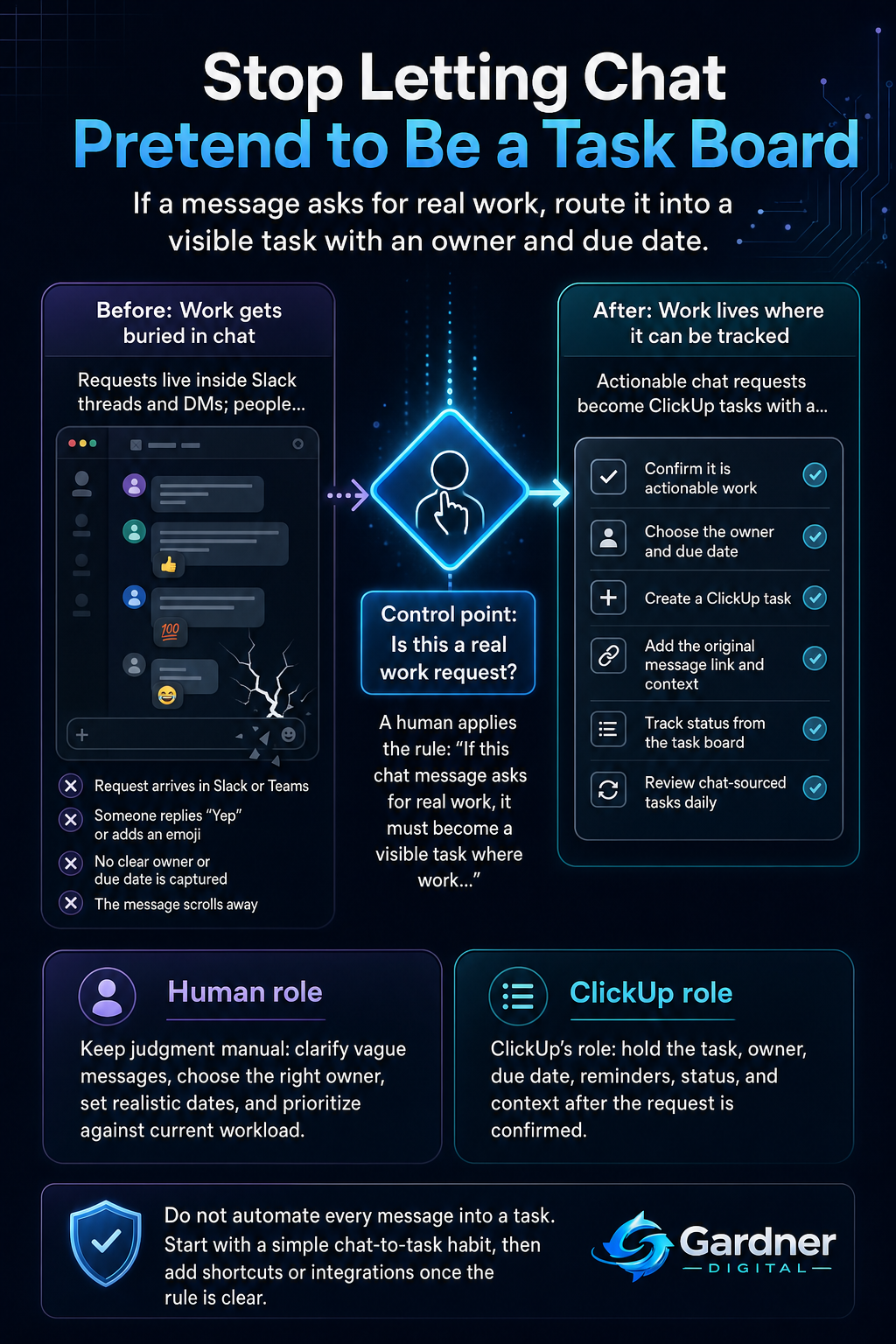
From Slack ping to owned ClickUp task
What this problem looks like
On a busy day, chat feels productive: messages fly, decisions get made, and everyone looks active. But underneath, real work is leaking.
A client shares new requirements in a long Slack thread. Someone drops a thumbs-up, then hops into a Zoom call. A teammate reports a bug in a channel, but no one copies it into the backlog. A manager asks, “Can you send me that proposal by Thursday?” and the only record is their message and your quick “Sure.” By the time you scroll back to find it, the context is fuzzy and the deadline is close—or already missed.
The pattern is the same: requests arrive in chat, feel urgent for a few minutes, then disappear into the stream because they never became visible tasks on a board that someone owns.
What changes when chat is not the task system
Before
- Client requests live only in Slack threads and DMs.
- People scroll back or search messages to remember what they promised.
After
- Every request that needs work becomes a ClickUp task with an assignee and due date.
- Follow-up happens from the task board, not from memory or chat history.
Why the workflow breaks
The root issue is that chat is built for conversation, not ownership. Messages are linear and fast, not structured like tasks.
When you treat Slack like a to-do list, a few predictable problems show up:
- No reliable capture: There is no guaranteed step where a message that contains a request is turned into a task.
- Missing owner: Messages often mention “we” or “someone,” so no one is clearly responsible for the next action.
- No built-in reminders: Once the message scrolls out of sight, there is nothing pinging you when it’s almost due.
- Scattered context: Details live across different threads, channels, and DMs, making it hard to see the full picture when doing the work.
- Weak handoff: Even if one person understands the request, there’s no clear handoff into the team’s task board or project plan.
All of this means your real work lives in a place that is designed to forget things quickly.
Step-by-step fix
- Decide where work actually lives. Pick a single task system—such as ClickUp—where all commitments must end up. This is where you assign owners, set dates, and track status.
- Define the trigger in chat. Create a simple rule: any Slack message that asks for work (contains a verb plus a when or a clear deliverable) must become a task within a few minutes.
- Give someone clear responsibility. For each client channel or internal channel, pick a primary “chat-to-task” owner. Their job is to scan messages and convert qualifying requests into tasks, or confirm that the requester does it.
- Turn messages into structured tasks. When a qualifying message appears, create a ClickUp task that includes: a short title, the original Slack link for context, the assignee, the due date, and any files or notes.
- Use ClickUp only where it supports the workflow. Use ClickUp for ownership, dates, and status—not for long conversations. Keep detailed back-and-forth in Slack but link to the task so anyone can see the work’s home.
- Run a daily “chat-sourced tasks” review. Spend a few minutes each day checking tasks that came from Slack that day: confirm owners, adjust dates, and close anything already done.
- Iterate and tighten the rule. After a couple of weeks, review where things still fall through the cracks and update your triggers and channel owners.
First manual control point
The first control point is human judgment at the moment a message arrives. Someone still needs to decide, “Is this just information, or is it an actual request that deserves a task?”
For example, a message like “FYI, client updated the brief in the shared doc” might not need a task. But “Please update the client dashboard with last month’s numbers by Friday” clearly does. Before you rely on any automation or bots, a person should confirm that the message is a real task, that the owner is correct, and that the due date makes sense given current workload and priorities.
Where the tool fits
| Workflow problem | Tool role | Human decision |
|---|---|---|
| Client requests are buried in Slack or Teams and get lost. | Use ClickUp as the single place where every client request becomes a task with a clear status. | Decide which messages count as true requests and which can stay as chat-only information. |
| No one knows who owns work that started as a quick message. | Assign an owner for each task in ClickUp and use assignees and watchers for visibility. | Choose the right owner for each task and make sure they agree with the scope and timing. |
| Deadlines are forgotten because chat has no reminder system. | Use ClickUp due dates, start dates, and simple reminders to surface upcoming work. | Set realistic dates and adjust them when priorities shift or capacity changes. |
| Context for a task is scattered across multiple channels and DMs. | Attach Slack message links, meeting notes, and documents to the ClickUp task so context is in one place. | Decide which snippets of conversation and which files are actually needed to do the work well. |
What to automate now vs. keep manual
Automate now
- Use a Slack shortcut or simple integration to create a ClickUp task from a message with one click.
- Set automatic reminders in ClickUp for tasks created from chat so they surface before the due date.
Do not automate yet
- Automatically turning every message in a channel into a task without human review.
- Auto-assigning tasks to people based only on keywords, without checking workload or priority.
What not to automate yet
Do not try to automate judgment. Tools should help you move clearly defined requests faster, not guess what matters.
Keep these pieces manual until your process is stable:
- Interpreting vague messages: Messages like “We should look into this” or “Can someone check this bug?” need a person to clarify the actual request before creating a task.
- Prioritizing across projects: Deciding whether a new chat request is more important than work already on the board is still a human call.
- Defining scope: Breaking a big “Can you handle this?” message into multiple tasks is best done by the person closest to the work.
When to use this workflow
This workflow is a strong fit when:
- Your team lives in Slack or Microsoft Teams all day.
- Real work—client requests, bug reports, content changes, follow-up reminders—regularly shows up in chat.
- You already use a task board such as ClickUp, but people still treat chat as the first place work appears.
- You’ve had at least one awkward moment where a client or manager asks, “Did this get done?” and you’re scrolling through messages to find the original request.
When not to use it
This specific workflow is not the right first move when:
- Your team rarely uses chat, and most work already comes through structured channels like a help desk, CRM, or formal intake form.
- You don’t yet have any shared task system in place; in that case, your first step is to choose and set up your core tool before tightening chat-to-task rules.
- You are in a very small team where one person handles everything and already captures requests in a personal system reliably.
FAQ
How do I get my team to stop treating Slack like a to-do list?
Make the rule simple and visible: “If it matters, it lives in ClickUp.” Share the expectation that every request with work attached becomes a task, and model the behavior yourself by immediately creating tasks from your own chat requests. You can also post a short checklist in key channels explaining what kinds of messages must become tasks.
Who should be responsible for turning messages into tasks?
For each important channel—such as a client channel, support channel, or internal project channel—assign a primary owner. Their job is to scan for actionable messages and either create tasks or confirm that the requester has done so. For high-stakes work, you can double up with a backup owner who checks once per day.
Do we really need another tool if we already have Slack and a spreadsheet?
Spreadsheets and chat can work in the very short term, but they do not scale well for ownership and follow-through. A tool like ClickUp gives you assignees, due dates, views by person and project, and a history of what actually got done. You can still use Slack for fast communication, but the work itself lives where it can be tracked over time.
What if clients only ever send requests in Slack?
That’s fine—as long as your internal rule is that those messages are just the starting point. Keep the client in Slack, but immediately turn their requests into ClickUp tasks on your side. You can even paste the ClickUp task link back into the thread so everyone sees that the work now has a home.
How do we avoid overloading ClickUp with tiny tasks from chat?
Introduce a minimum bar for task creation. For instance, only messages that will take more than ten minutes to act on, or that have a clear due date, should become tasks. Quick clarifications, simple yes/no questions, and one-minute actions can stay in chat without being captured on the board.