
Opening scene: It’s 4:45 p.m. on a Thursday and you’re trying to confirm what’s actually getting done before the end of the week. One update is buried in a Slack thread, another lives in a reply-all email, the latest copy is in someone’s personal Google Doc, and the “real” task list is in a half-updated spreadsheet. Everyone insists they’re working hard, but nobody can point to a single place that shows what’s in motion and who owns what.
Direct answer
The root problem isn’t that your team is distracted or lazy. The problem is that every handoff sends work into a different place with no clear owner.
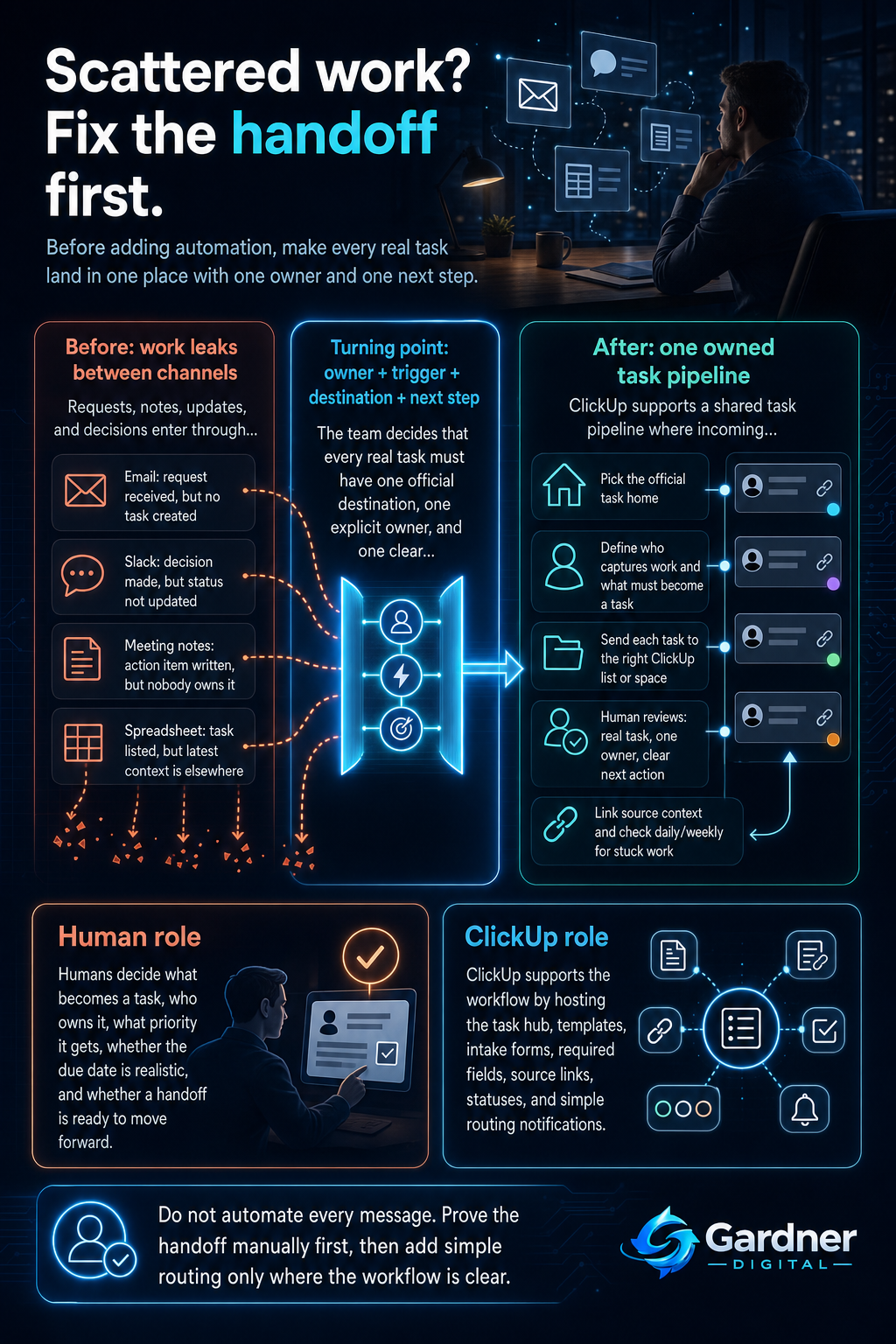
The practical fix is to design a simple handoff workflow: every new piece of work lands in one shared system, gets one explicit owner, and has one next step. Only after that is clear do you bring in a tool like ClickUp to host the work, map handoffs, and keep updates in one place.
What this problem looks like
When handoffs are weak, the day starts looking like this:
- A client request comes in via email. Someone says, “Got it,” but there’s no task anywhere.
- Project feedback happens in a Slack channel, while the official task still lives in a spreadsheet that never gets updated.
- Meeting notes sit in a doc with bullets like “Follow up with finance” and “Update landing page,” but nobody turns them into owned tasks.
- Two people assume the other person is on it because both were tagged in a message, but neither was assigned the work.
The pattern: the moment work moves from one person or channel to another, it loses structure. Details live in one place, decisions in another, and ownership in… no place.
Why the workflow breaks
Scattered work is almost always a workflow problem with the same core causes:
- Unclear capture: New tasks appear in email, Slack, or meeting notes, but there’s no agreed rule that “this is how we turn it into a real task.”
- Missing owner: People are included, cc’d, or @mentioned, but nobody is explicitly assigned.
- Weak handoff: Work moves from marketing to dev, or sales to ops, without a standard checklist of what must be provided (specs, links, due date, priority).
- No reminder: Even when a task exists, there’s no clear due date, status, or follow-up reminder—so it quietly slips.
- Scattered context: The task is in one place, but the latest details live in a Slack thread, a doc, or someone’s memory.
Without a strong handoff rule, every person invents their own way of managing work. That’s how you end up with five “systems” that don’t talk to each other.
Step-by-step fix
- Pick one place that “owns” work.
Decide where tasks officially live—your single source of truth. For many teams, this is a ClickUp Space or specific List (e.g., “Marketing Requests” or “Client Projects”). Spreadsheets, email, and Slack can still exist, but they are not the official record. - Define the owner, trigger, and destination for every new task.
Make three rules explicit:- Owner: Who is responsible for turning raw requests (emails, Slack messages, meeting notes) into tasks? For example, the account manager for client emails, or the meeting organizer for action items.
- Trigger: What counts as “must become a task”? For example: any request that takes more than 10 minutes, any client ask, or any item labeled as a decision in meeting notes.
- Destination: Exactly where does that task land? For example: all inbound client work goes into the “Client Requests” list in ClickUp with the client name, due date, and status field filled in.
- Use the tool only where it supports the workflow.
Once the rules are clear, configure ClickUp to match them instead of the other way around:- Create standard task templates with required fields like owner, due date, and source (email, Slack, meeting, etc.).
- Set up simple forms or intake lists for common handoffs—e.g., a “New Marketing Request” form that automatically creates a task in the right list.
- Use basic automations for routing, not decision-making: for example, “When a form is submitted, assign to the intake owner and set status to ‘New’.”
- Link back to the source context (email thread, doc, or Slack message) in the task description so you’re not hunting later.
- Check whether the next action actually happened.
Build a small review loop so someone verifies that handoffs turned into real progress:- Once a day, the intake owner checks ClickUp for new tasks and ensures each has a single assignee, a clear next step, and a realistic due date.
- Once a week, the team quickly scans the board or list for tasks stuck in “In Review” or “Waiting” and clarifies who needs to move them.
First manual control point
Before you automate anything beyond simple routing, set one explicit human checkpoint: after each new task is created from email, Slack, or meeting notes, a real person must confirm three things:
- Is this a real task (not just an idea or a “nice to have”)?
- Is one person clearly assigned as the owner?
- Is the next action obvious from the task title and description?
In practice, that might be a project manager spending 15 minutes each morning inside ClickUp, quickly cleaning up new tasks: merging duplicates, clarifying vague titles like “Website stuff,” and pushing back on unclear requests. This manual control point keeps your system from filling up with noise that automations will only amplify.
Where the tool fits
| Workflow problem | Tool role | Human decision |
|---|---|---|
| Client requests stay in email and get lost. | Use ClickUp to create a dedicated “Client Requests” list or Space and capture each request as a task, with links back to the original email. | Decide which emails become tasks, what priority they get, and which client commitments can realistically be met by the requested date. |
| Meeting notes turn into a long document nobody revisits. | Turn action items from meeting notes into ClickUp tasks, grouped under the relevant project or sprint board. | Decide which notes are true action items, who owns each one, and which can be dropped or parked for later. |
| Updates are scattered across Slack and docs. | Keep ClickUp as the single source for task status and latest decisions, and paste or summarize important Slack updates into the task comments. | Decide what information is important enough to capture, how to summarize it, and when to say “Let’s put this back in the task instead of this thread.” |
| Work stalls when it moves between teams (e.g., sales to delivery). | Model your handoff stages in ClickUp (e.g., statuses or lists) and use simple automations to notify the next owner when a task changes stage. | Define what “ready” means at each stage, and who has the authority to move a task forward or send it back for more info. |
| Too many tools, no clear “home” for tasks. | Make ClickUp the central task board and reference point, while still linking out to docs, spreadsheets, or calendars as needed. | Agree as a team that “if it’s not in ClickUp, it’s not officially in scope,” and hold each other to that standard. |
What not to automate yet
Some parts of the workflow are tempting to automate, but should stay manual until your process is stable:
- Auto-creating tasks from every email or Slack message. This fills your system with noise. Start by manually choosing which items deserve a task.
- Automatic reassignment or status changes based on keywords. Until your team is consistent with naming and descriptions, these rules can misroute work.
- Complex multi-step automations across tools. For example, auto-creating tasks from a form, then updating a spreadsheet, then messaging a channel. Get the basic handoff right in one system first.
- Automated due dates for everything. People still need to think about realistic timeframes instead of letting the system pick arbitrary dates.
Automation works best once you’ve proven the workflow manually and everyone understands the rules.
When to use this workflow
This handoff-focused approach is a good fit when:
- You regularly ask, “Where is that task?” or “Who’s on this?” and nobody is sure.
- Most work starts in email, Slack, or meetings, but there’s no consistent way it becomes a tracked task.
- Your team already uses ClickUp (or is open to it) but mainly as a to-do list, not as the central hub for ownership.
- You work across functions—like marketing, sales, product, and ops—and projects move between teams.
- Leaders want visibility into what’s in progress without manually asking everyone for updates.
When not to use it
This is not the right first move if:
- Your main issue is what to work on, not where the work lives (strategy, not execution).
- Your team is truly tiny (1–2 people) and already aligned in a simple shared list or calendar with no confusion.
- You’re in the middle of a larger tool migration and haven’t agreed on a primary system for tasks yet—solve that decision first.
- Your work is highly ad hoc and low stakes, where missed tasks don’t really matter—adding structure might be overkill.
In those cases, start by clarifying priorities and responsibilities at a higher level, then come back to handoff workflows when scattered tasks become a real drag.
FAQ
How do I convince the team to actually use one system?
Don’t start with a big speech about tools. Start with a clear promise: “If it’s in this ClickUp space, it will be seen and acted on. If it’s only in Slack or email, it might be missed.” Then model the behavior yourself—capture requests into tasks during meetings, paste the task link in the chat, and use that task as the reference point. People adopt what obviously makes their day easier.
What if different departments prefer different tools?
Agree on one system that “owns” cross-team work, even if individual teams keep their own preferences for internal details. For example, a dev team might have its own setup, but any task that affects other teams also lives in a shared ClickUp space with clear owners and due dates. The key is a shared place for handoffs, not forcing everyone to abandon their internal habits overnight.
We’re already in ClickUp—why does work still feel scattered?
Being in the same tool isn’t enough if you haven’t solved ownership. Look for tasks with no assignee, vague titles, missing due dates, or decisions that only live in Slack. Tighten your handoff rules first: every new task must have one owner, a clear outcome, and a place in the workflow. Then use ClickUp to reflect those rules instead of just hosting a long to-do list.
How detailed should our handoff rules be?
Start light and specific. For example: “Every client email that asks for work becomes a task in the ‘Client Requests’ list, with the client name, requested date, and a link to the email. The account manager is responsible for creating it within one business day.” You can refine fields and edge cases later, but even simple rules like this will dramatically cut down on scattered work.