
It’s Monday at 8:45 a.m. You open Google Calendar and see a solid wall of color: standups, "quick" check-ins, recurring status calls. The gaps between meetings are 10–20 minutes long—just enough to skim email or answer a Slack thread, never enough to actually write the proposal that’s due Thursday. That proposal lives on a separate to-do list, so it quietly slides into your evening again.
Direct answer
Your real work is not stuck because you lack discipline; it is stuck because your calendar treats meetings as non‑negotiable and focus time as optional. The workflow fix is to treat deep work like any other critical appointment: give it recurring, protected blocks on your calendar, then let a scheduling tool reshuffle those blocks around meetings instead of doing it by hand every day. A tool like Reclaim.ai helps you automatically defend a minimum number of focus hours during the week, but the core rule—"important work must live on the calendar"—comes first.
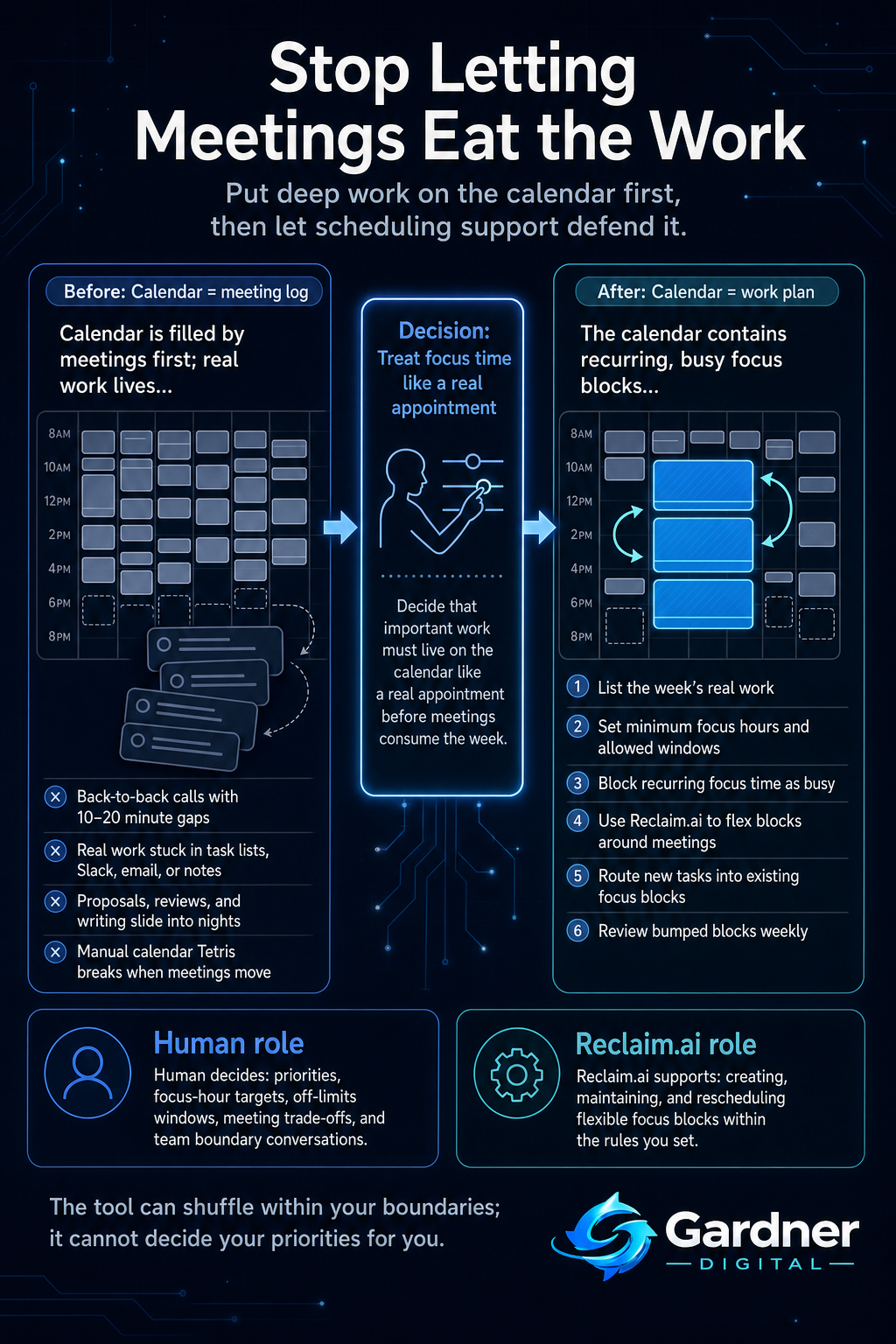
From random gaps to protected focus blocks
What this problem looks like
This shows up in small, repeatable ways long before burnout hits. Your calendar is back-to-back from 9 to 5:30 with project check-ins, “quick” syncs, and standing team calls. The only place your actual work lives is a long task list in a tool like Asana or a personal spreadsheet. You try to squeeze real work into 15-minute gaps, or you multitask during Zoom meetings with email and Slack open.
By Thursday, the deck you meant to start on Monday still isn’t touched. So you open your laptop at 9:30 p.m. to "just get it done". Sunday evening becomes your catch-up time for doc reviews you never had energy or space for during the week. The calendar looks busy, but progress on the work that actually moves the business is slow and stressful.
What changes when you defend focus time
Before
- Your Google Calendar is a rainbow of meetings with 10–20 minute gaps all day.
- Important tasks like proposal writing and document reviews live in a separate to-do app and slide into nights and weekends.
After
- Your calendar shows two or three visible focus blocks each day that are treated like real meetings.
- Tools like Reclaim.ai automatically adjust those blocks around new meetings so your minimum deep work time still happens during work hours.
Why the workflow breaks
This isn’t about being bad at time management. The workflow breaks for structural reasons:
- Capture is lopsided. Meetings go straight onto the calendar with invites, times, and reminders. Your own deep work tasks stay in meeting notes, Jira tickets, or a task board, not on the calendar.
- No one “owns” focus time. Every invite from someone else has an owner and a clear start time. Your focus work has no defender. Urgent requests always feel more real than an unscheduled task.
- Short gaps look usable but aren’t. A 15-minute gap between calls looks like available time, but by the time you switch context, you only get a few minutes of shallow progress.
- The calendar is a meeting log, not a work plan. It shows who wants your time, not what work needs to move. Without a rule that puts deep work on equal footing with meetings, your calendar will always prioritize other people’s urgency.
Step-by-step fix
- List your non-meeting work for the week. Open your task board, email, and meeting notes. Identify the big, thinking-heavy items: proposals, strategy docs, code reviews, planning, hiring decisions. Estimate roughly how many hours they need.
- Set a minimum focus-time rule. Decide on a realistic baseline, like "at least 3 hours of deep work per day" or "15 hours of focus time per week". Also decide when focus time is allowed—for example, no meetings before 10:00 a.m. on three days a week.
- Block recurring focus slots on your calendar. Create calendar events labeled "Focus – project work" or similar. Make them recurring, at the times most likely to stick (for many people, mornings). Treat them as busy, not as soft holds.
- Use Reclaim.ai to make those blocks flexible but protected. Connect Reclaim.ai to your calendar and set it to create and maintain focus blocks based on your rule: how many hours you want, when they can happen, and how flexible they are. Let it move blocks around when new meetings appear instead of you dragging events all week.
- Route new work into existing focus time. When a new task appears in email or Slack, don’t hunt for a spare gap. Decide which existing focus block it belongs to. If needed, rename that block with the specific task so the time has a clear purpose.
- Run a short weekly review. Once a week, scan last week’s calendar. Where did focus blocks get bumped or cancelled? Adjust your rules or meeting boundaries, and update Reclaim.ai settings so the system reflects reality, not wishful thinking.
First manual control point
The key human checkpoint is deciding how much focus time you can realistically protect and which hours are truly available. Before you let any tool generate blocks, manually walk your week:
- Mark non-negotiables: client calls, key team meetings, personal commitments.
- Identify your best focus windows: for example, 9–11 a.m. on Tuesday–Thursday.
- Decide what you are willing to say “no” or “not this week” to if meetings try to take over those windows.
Only after that manual pass should you formalize the rule inside Reclaim.ai. The tool can shuffle within your boundaries; it can’t decide your priorities for you.
Where the tool fits
| Workflow problem | Tool role | Human decision |
|---|---|---|
| Important work stays on a task list and never reaches the calendar. | Reclaim.ai turns your focus-time rule into actual calendar blocks so deep work shows up alongside meetings. | Decide which tasks are "deep work" and how many hours they deserve this week. |
| New meetings constantly break your manual focus holds. | Reclaim.ai can reschedule flexible focus blocks when new events appear instead of you dragging events around. | Set how flexible focus blocks should be and what times are off-limits for meetings. |
| It’s hard to see if you’re actually hitting your focus-time target. | Reclaim.ai helps track scheduled focus time so you can see patterns over weeks. | Review patterns and decide if you need stricter boundaries or fewer recurring meetings. |
What to hand to Reclaim.ai and what to keep in your hands
Automate now
- Creating and maintaining recurring focus blocks based on your weekly hour targets.
- Rescheduling flexible focus time when new meetings are added, within the windows you’ve approved.
Do not automate yet
- Setting priorities for which projects deserve focus time this week.
- Deciding when to decline or move meetings that repeatedly land on your best focus hours.
What not to automate yet
Some parts of this workflow should stay manual, especially at the start:
- Strategic trade-offs. No tool can know that finishing one client proposal is more important than attending a non-critical status call. You still need to make that call and sometimes say no.
- Team norms. You can’t automate your way out of a culture where everyone expects instant meeting acceptance. You’ll need direct conversations about response times and “no meeting” blocks.
- Edge weeks. For weeks with travel, offsites, or launches, you may want to override normal rules and manually curate your calendar so focus time matches reality.
When to use this workflow
This approach is a good fit when:
- Your calendar is regularly full of meetings and you’re doing core work at night or on weekends.
- You use Google Calendar or a similar digital calendar as your primary schedule source.
- You already track tasks somewhere (email, spreadsheets, task boards) but they rarely get scheduled.
- You have enough control over your schedule to move or decline at least some meetings.
When not to use it
This is not the first move when:
- Your workload is unpredictable shift-based work where you genuinely cannot control when tasks arrive.
- You have very few meetings and the problem is unclear priorities, not calendar clutter.
- Your organization won’t respect any blocked time, no matter what it’s labeled—then the first step is a conversation about boundaries, not a new scheduling rule.
- You’re still learning your own best focus times; in that case, start by experimenting manually for a few weeks before formalizing rules in Reclaim.ai.
FAQ
How many hours of focus time should I block each week?
Start with a realistic baseline rather than an ideal one. If you currently have almost no focus time, try protecting 8–10 hours per week and see if you can consistently keep them for a month. Use that data to adjust up or down. The right number is whatever lets your key projects move forward without forcing you into late nights.
What if people keep booking over my focus blocks?
First, make the blocks clearly labeled as busy, not tentative. Then decide which blocks are truly non-negotiable and which can move. You may need to communicate to your team that certain windows—like 9–11 a.m. on specific days—are reserved for deep work. A tool like Reclaim.ai can help move flexible blocks, but it can’t replace boundary-setting conversations.
Can I use this workflow if most of my work comes through Slack and email?
Yes, but you’ll need a simple rule for routing that work. For example: anything that takes more than 30 minutes gets assigned to an existing focus block this week. When a substantial task shows up in Slack or email, don’t leave it there; decide which focus block it belongs to and, if needed, rename that block so your calendar tells you exactly what to work on when the time arrives.