
It’s 10:45 p.m. and you finally open your laptop on the sofa. Gmail shows 74 unread messages. You quickly star a client’s “Can you review this proposal?” email, mark another as unread so you don’t forget, and leave a half-written reply in drafts for a prospect asking for next steps. You tell yourself, “I’ll handle these properly tomorrow.” By Friday, all three are buried under a pile of new threads.
Direct answer
If your follow-up system is "I’ll remember to reply later," you don’t have a follow-up system. The fix is to stop treating your inbox like a CRM and add one simple layer: every important email becomes a dated follow-up task on a small list that you review daily. Then you use a helper like Lindy AI to draft replies and set reminders, so you’re editing and sending instead of trying to remember and start from scratch.
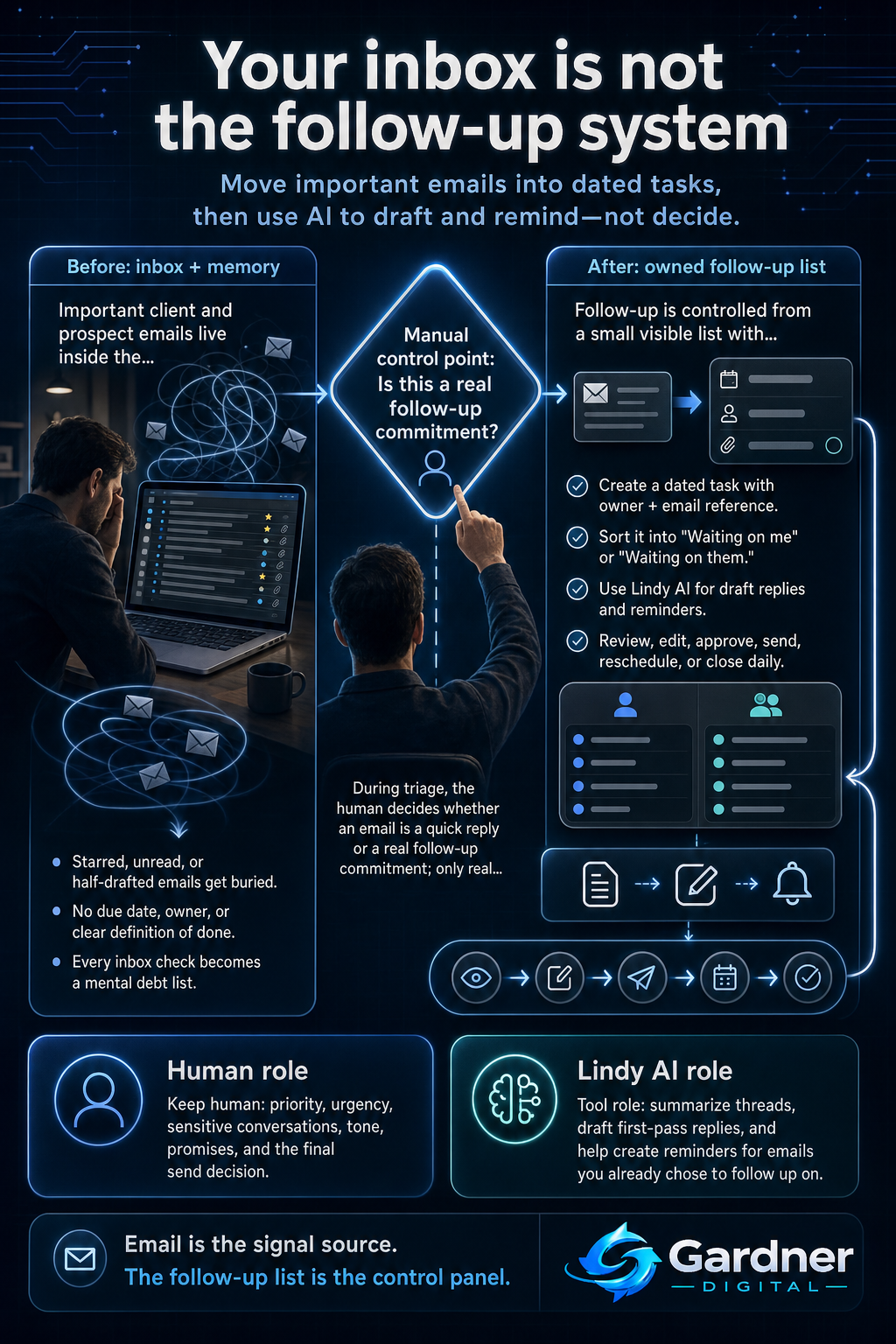
From messy inbox to owned follow-up task
What this problem looks like
When your inbox is pretending to be your CRM, your workday quietly fills with small messes. You star emails that matter, but the starred list becomes so long you never scroll to the bottom. You send emails to yourself as reminders with subject lines like “FOLLOW UP WITH SARA,” then forget what you meant when you finally open them.
You search for “from:John has:attachment proposal” because the client’s message has disappeared into the pile. Your task board is mostly for big projects, so all the little “reply to this person” items stay trapped in Gmail or Outlook. Clients end up nudging you in new threads with lines like “Just bumping this to the top of your inbox,” and prospects go quiet because they think you’re not interested.
What changes when email stops being your CRM
Before
- Important client emails are marked unread, starred, or buried in long threads.
- You rely on memory, late-night inbox checks, and search tricks to chase loose ends.
After
- Any email that needs thought becomes a dated follow-up task on a small, visible list.
- You review the list daily, with draft replies already prepared, so messages actually go out.
Why the workflow breaks
This isn’t a character flaw or a willpower issue. The workflow breaks for structural reasons:
- Capture is vague. Starring or marking unread doesn’t say when you’ll respond or what “done” looks like.
- No clear owner. When you work in a shared inbox or team address, nobody is explicitly on the hook.
- No reliable reminder. Email clients are built for messages, not for follow-up logic. Threads move down as new mail arrives, so older commitments simply slide out of view.
- Context is scattered. Details live in email, meeting notes, and maybe a spreadsheet, so replying often feels like re-reading the entire history.
- Mental load is high. Every inbox check triggers a mental tally of people you “owe” a reply, which is exhausting and easy to avoid.
Once your volume passes a certain point, no amount of starring or self-reminders can keep up. The system itself needs a change.
Step-by-step fix
- Set a specific triage time. Decide when you’ll process email for follow-up work: for example, 20–30 minutes mid-morning and late afternoon. Outside those windows, you don’t chase every new ping.
- Define what becomes a follow-up task. During triage, skim each email and ask: “Does this require more than a two-minute reply?” If yes, create a task in your task board or to-do app with a clear title ("Reply to Maya about contract changes"), link or reference to the email, and a due date.
- Keep a simple two-column view. Maintain a small list labeled "Waiting on me" and "Waiting on them." Anything that needs your reply now goes in "Waiting on me" with a date. Things where you’re waiting for a client or prospect go in "Waiting on them" with a check-in date.
- Use Lindy AI to reduce reply friction. For emails that became tasks, have Lindy AI propose draft responses based on the thread. You then review, adjust tone or details, and send. This turns “I need 20 minutes to write this” into “I need 3 minutes to edit and approve.”
- Let reminders handle the memory. Instead of holding dates in your head, use your task app’s due dates and Lindy’s reminders so you have a daily agenda that surfaces follow-ups without scrolling your inbox.
- Close the loop each day. At the end of the day, quickly scan your "Waiting on me" list. Either send the reply, reschedule the task with intention, or decide it’s no longer needed and close it.
First manual control point
The most important manual control point is deciding what counts as a real follow-up commitment. Every time you triage email, you make a human decision: is this a quick reply I can send now, or does this deserve a dedicated follow-up task with a date?
That decision should not be automated. You understand relationship nuance, client expectations, and what truly matters this week. Before anything hits your follow-up list or your assistant suggests a reply, you briefly judge:
- Is this worth future time and attention?
- How urgent or sensitive is it?
- Does it affect revenue, trust, or a key project?
Only after that manual call does the workflow move into tasks, reminders, or drafted responses.
Where the tool fits
| Workflow problem | Tool role (Lindy AI) | Human decision |
|---|---|---|
| You open an email that clearly needs a thoughtful, multi-paragraph reply. | Summarizes the thread and drafts a reply based on what was said, so you are editing instead of starting from a blank screen. | Confirm if the draft is accurate, matches your tone, and reflects any promises you actually want to make before sending. |
| You have more follow-ups than you can remember, spread across different days. | Creates reminders or tasks linked to specific emails, so you can rely on a list and notifications rather than memory. | Choose realistic dates, priorities, and which conversations are safe to nudge later vs. must-do today. |
| Your "Waiting on them" list grows, and you lose track of who to chase. | Helps you generate short, polite check-in messages and suggests which threads haven’t moved in a while. | Decide whether each follow-up is appropriate now, needs a softer tone, or should be left alone. |
| You spend time rewriting similar responses to common questions. | Reuses your past approved wording as a starting point for new replies, keeping consistency without manual copy-paste. | Approve when a template is fine and when a unique, more personal answer is needed. |
What to automate now and what to keep human
Automate now
- Creating follow-up reminders for emails you’ve already decided need a response on a specific date.
- Drafting first-pass replies to routine questions or status updates you send often.
Do not automate yet
- Deciding which clients or prospects deserve a follow-up in the first place.
- Handling sensitive conversations where tone, timing, or negotiation details could materially affect the relationship.
What not to automate yet
Some parts of follow-up should stay firmly manual until your process is mature:
- Priority setting. Only you know which prospect is close to signing, which client is at risk, and which internal thread can safely wait. Let tools show you options, but make the call yourself.
- Escalations and bad news. Fee increases, scope changes, missed deadlines, or performance issues should be drafted and reviewed manually. An assistant can help with structure, but you should own every word.
- Relationship-specific nuance. Some clients appreciate very direct messages; others need more context. Those patterns live in your head, not in a generic automation rule.
When to use this workflow
This email-to-task follow-up workflow is a good fit when:
- You handle a steady stream of client and prospect emails every day, and a few slip through weekly.
- You’re a solo consultant, agency owner, or manager juggling both delivery work and sales conversations.
- Your current system is stars, flags, and self-sent reminders, and you still get “Just bumping this to the top of your inbox” nudges.
- You already use some kind of task list or task board but haven’t connected it cleanly to email yet.
When not to use it
This workflow is less useful, or at least not the first move, when:
- You receive very low email volume and can genuinely handle all follow-up within a couple of minutes a day.
- Your team already runs almost everything through a dedicated CRM or ticketing system, and email is mostly just notifications.
- You don’t yet have any basic task system (even a simple to-do list). In that case, it’s better to choose and stabilize one place for tasks before adding automation and assistants on top.
- Your main follow-up channel is something else entirely, like phone calls, a support queue, or in-app chat. The principles still apply, but the exact steps will differ.
FAQ
How is this different from just being more disciplined with email?
Discipline assumes your brain can track dozens of parallel conversations and deadlines. Once volume is high, that’s unrealistic. This workflow changes the structure: instead of trying to remember who needs a reply, you convert important messages into dated tasks on a small list you can actually review. Tools like Lindy AI then reduce the writing and reminding effort, so the system works even on messy days.
Do I need a full CRM to fix my follow-up problem?
Not necessarily. If you run large sales teams and complex pipelines, a CRM is essential. But many solo operators and small teams just need a reliable way to capture follow-up from email and see it on a clear list. A simple task app plus an assistant to help with drafts and reminders can cover a lot of ground before you take on the overhead of a full CRM rollout.
Where should I keep my "waiting on me / waiting on them" list?
The best place is wherever you already manage day-to-day work: a lightweight task board, a to-do app, or even a shared list if multiple people handle the inbox. The key is that it’s not email itself. Email is the signal source; the list is the control panel. Lindy AI can help you create and update tasks from incoming emails, but you still choose the tool that fits your existing workflow.
What if my inbox is already out of control?
Start from today forward. Pick a date, archive or bulk-mark old threads as read, and commit to triaging new mail with the follow-up rules. As you work, you’ll naturally surface older important threads and can convert those into tasks as you go. The goal isn’t perfection; it’s having a reliable path from new email to owned follow-up.
Will using an AI assistant make my replies feel generic?
Only if you let it send without thoughtful editing. Treat Lindy AI as a drafting partner: it assembles a reasonable first version based on the thread, then you adjust language, add specifics, and decide what you are comfortable saying. Over time, you’ll learn which types of replies can be lightly edited and which require you to write more of the message yourself.