
It’s Monday morning on Zoom. Your team is scrolling through a cluttered deal board in your CRM. Half the opportunities say things like “Great call – follow up soon.” When you ask what actually needs to happen next, your account exec squints at their notebook, opens a random Google Doc, then says, “We talked about it on the call… I just haven’t put it in here yet.” No one can find the exact decision, and by the time you do, the prospect has already replied to a faster competitor.
Direct answer
You don’t need more meetings. You need one reliable path from meeting decisions into dated follow-up tasks. The fix is a simple rule: every external call leaves behind a single, searchable record where decisions, owners, and follow-up dates are pulled out the same day and pushed into your CRM or task board. A tool like Fireflies.ai helps by capturing the call and giving you a transcript and summary so you’re not re-listening for details, but the core system is the workflow: record → review → extract actions → log them where you actually track work.
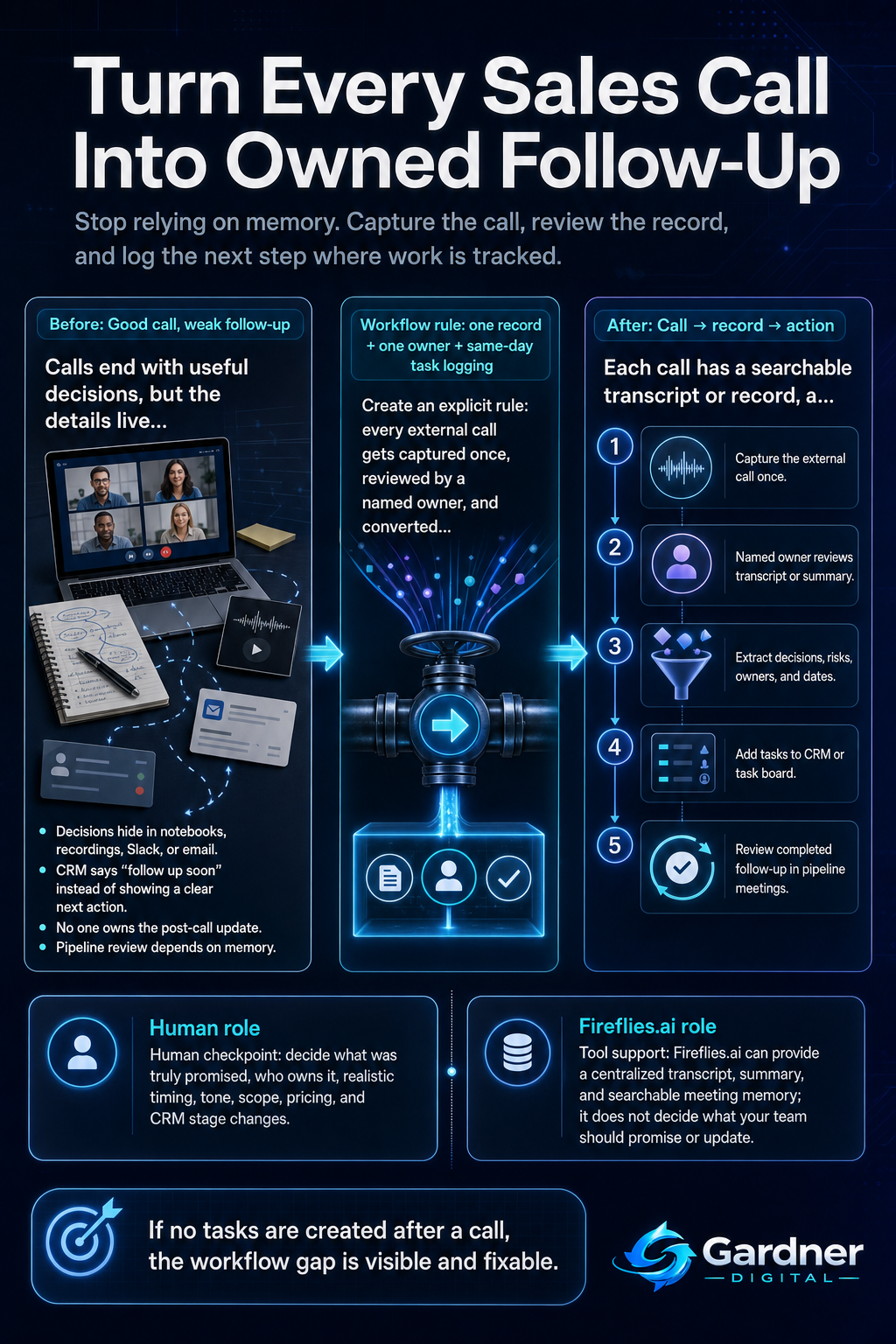
From sales call to owned follow-up
What this problem looks like
This gap shows up in small, boring ways long before a deal is obviously lost. Notes from a discovery call live in someone’s personal notebook. The only detailed record of pricing changes is buried in a Zoom recording no one has time to re-watch. A key client request is captured in a Slack DM: “Remind me: follow up with Sarah in 2 weeks.” When the follow-up date arrives, there’s nothing visible in the CRM, no calendar reminder, and no task on the team’s board—just a vague feeling that you’re missing something.
In the next meeting, you end up asking the same discovery questions again or saying, “Let me double-check what we agreed last time.” The client notices. Inside the team, people start saying, “I thought you had it,” because no one can point to a single, shared record of the commitment.
What changes when every call has a single record
Before
- Key decisions live in one rep’s notebook or a forgotten Zoom file.
- Next steps are vague: “follow up soon” in CRM, if they’re logged at all.
After
- Each call has a searchable record with decisions, risks, and follow-up notes.
- Concrete tasks with dates and owners show up in your CRM or task board the same day.
Why the workflow breaks
The issue isn’t bad intentions; it’s a broken chain from conversation to system. The weak links are:
- Unclear capture: Everyone assumes someone else is taking “proper” notes, but no one knows where those notes live.
- Missing owner: There’s no named person responsible for turning the call into CRM updates or tasks.
- Scattered context: Pieces of the same conversation are split between email threads, meeting notes, Zoom recordings, and Slack messages, so it’s faster to move on than to hunt them down.
- No follow-up checkpoint: Pipeline reviews look at deal stages, not whether the agreed actions were actually created and completed.
Relying on memory to bridge those gaps works for a few deals, then quietly breaks as soon as the calendar fills up.
Step-by-step fix
- Set a capture rule for all external calls. Decide which calls get recorded and documented (for many teams, it’s all sales and key client calls). Make that rule explicit so no one is guessing.
- Assign the “post-call owner.” For each meeting on the calendar, one person is responsible for turning the conversation into decisions and tasks within a set time window, for example, by end of day.
- Use Fireflies.ai to support, not replace, the workflow. Have Fireflies.ai join the call so you get a transcript and summary. After the call, the owner skims the summary and key moments to pull out decisions, risks, and concrete follow-ups, then logs them into your CRM or task board.
- Add a follow-up check into pipeline reviews. During weekly reviews, don’t just ask, “How did the call go?” Instead, check: “What tasks were created from that call, and are they done?” If there are no tasks, that’s a visible gap you can fix on the spot.
First manual control point
The first control point is the short review right after the meeting. A human—usually the account owner—should spend a few minutes with the transcript or summary and ask:
- What did we actually commit to, in clear language?
- Who owns each commitment on our side?
- What date did we promise, or what deadline makes sense given the client’s timing?
Only once those answers are clear should anything be pushed into automation or shared out. This small manual step prevents vague “to-dos” and keeps you from sending automated follow-ups that don’t match what the client remembers.
Where the tool fits
| Workflow problem | Tool role | Human decision |
|---|---|---|
| Important details only exist in someone’s handwritten notes or scattered email threads. | Fireflies.ai joins the call and produces a centralized transcript and summary that anyone on the team can open. | Decide which calls are recorded and who in the organization has access to those records. |
| Reps avoid updating the CRM because re-listening to calls is slow. | Use the transcript search and summary to jump directly to parts of the conversation where decisions or objections were discussed. | Choose which decisions and follow-ups are meaningful enough to become CRM entries or tasks, instead of logging everything. |
| New team members lack context when they join mid-deal. | Share the meeting record so they can read or scan the call history instead of asking for long recaps in Slack or email. | Decide what context a new owner must read before they talk to the client, and what can stay as optional detail. |
| Follow-up reminders depend on someone’s calendar or memory. | After skimming the transcript, the owner copies agreed dates and next actions into the CRM, task board, or calendar with clear due dates. | Set realistic follow-up dates and adjust if the client’s situation changes, rather than letting an automation choose the timing on its own. |
Decide what to automate now and what to keep human
Automate now
- Automatically capturing and storing meeting transcripts for all sales and client calls.
- Sending a simple internal reminder to the call owner to review the transcript and log tasks the same day.
Do not automate yet
- Writing client-facing follow-up emails without a human checking tone, promises, and exact wording.
- Creating or updating deal stages in your CRM based solely on keywords from the transcript.
What not to automate yet
Some parts of the meeting-to-follow-up chain benefit from staying manual while you’re still refining the process. In particular, avoid fully automating how you summarize commitments back to the client, how you adjust pricing or scope based on nuanced conversations, and how you move deals between pipeline stages. Those steps depend heavily on judgment, context, and relationship-reading that a transcript alone can’t capture. Use tools to surface the right moments; keep a human in charge of what you actually promise and what you click in the CRM.
When to use this workflow
This approach is a strong fit when your team runs frequent external meetings where each call may affect revenue or client satisfaction: sales discovery calls, proposal reviews, onboarding calls, quarterly business reviews, and key project check-ins. It works especially well if:
- You already have a CRM or shared task board, but updates are inconsistent.
- Deals or projects involve more than one internal stakeholder who needs access to the same conversation history.
- You often say, “We discussed that on a call somewhere,” but can’t quickly prove exactly what was agreed.
When not to use it
This is overkill for quick, low-stakes chats where nothing needs to be tracked beyond a single email, or for environments where recording is not allowed or appropriate. If you don’t yet have a basic place to put tasks—like a CRM, a shared spreadsheet, or a task board—you should set that up first. And if your real bottleneck is very few opportunities coming in, fixing your meeting-to-follow-up workflow will help, but it shouldn’t be your only focus.
FAQ
How much time should reps spend reviewing a transcript after each call?
Most teams can get what they need in five to ten minutes. The goal isn’t to read every word; it’s to skim the summary and search for key phrases (like “next week,” “we’ll send,” or “contract”) so you can pull out decisions, owners, and dates. If the review is taking much longer, tighten your checklist to just the information that needs to hit the CRM or task board.
Do I still need to take notes during the call if it’s being recorded?
Light notes are still useful. Simple markers like “client concern about timing” or “confirmed budget range” help you know what to search for later in the transcript. Think of Fireflies.ai as your detailed memory and your own notes as a quick index that points you to the important parts of the conversation.
What’s the minimum setup to get value from this workflow?
You need three pieces: a consistent way to capture calls (for example, Fireflies.ai joining scheduled meetings), a shared system where follow-up tasks live (such as your CRM, a task board, or even a structured spreadsheet), and an explicit rule that the call owner logs decisions and next steps by a certain time. With just those in place, you reduce the number of deals that quietly stall because no one remembered what was promised.